Pairing multi-functional devices
Devices which have more than one functionality in one physical fixture unit (e.g. a luminaire and a sensor in same device) can also be paired the same way as single-function devices. When this is done, each different part of the fixture will have their own elements in the layout, Project Explorer list and Network list.
Currently Casambi Pro supports only dual devices with the following combinations:
- Luminaire and sensor
- Luminaire and switch
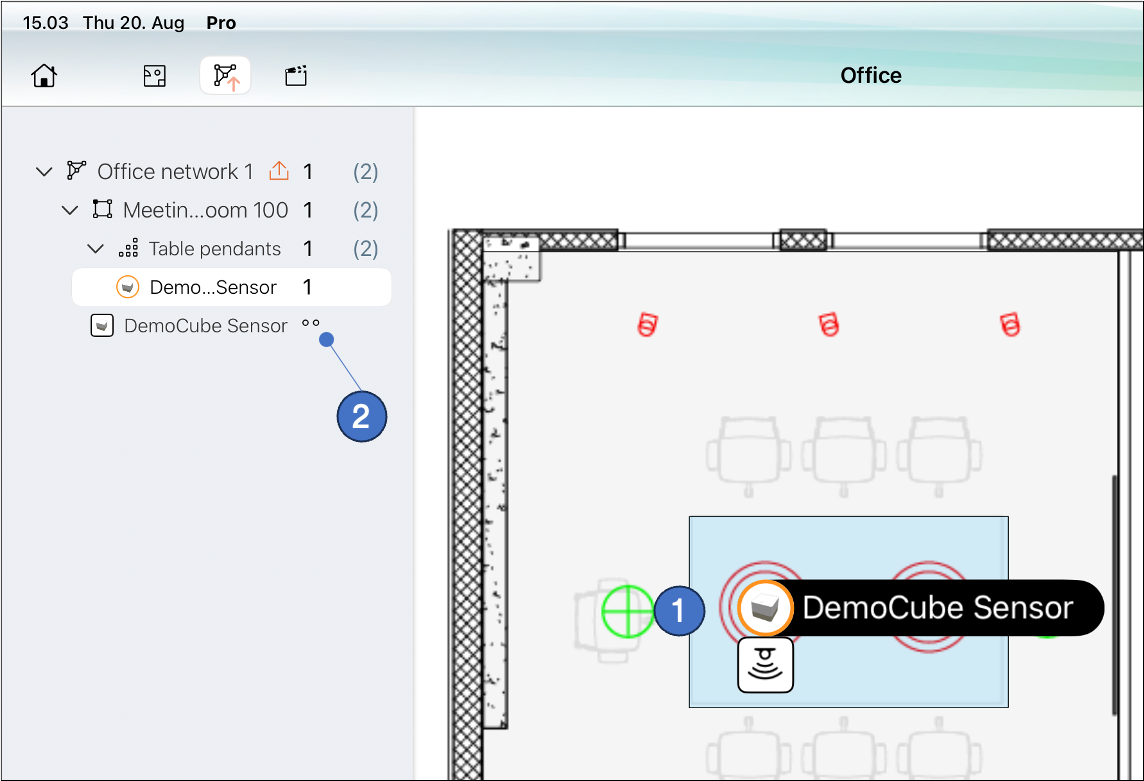
Casambi Pro project after pairing a device with two functions (in this case, a luminaire + sensor):
-
On the layout, the multi-functional device appears as two elements attached together.
- The luminaire part is circular, and the controller part is a rectangle. Both parts have the same name, coming from the fixture.
- Both parts can be selected individually. The Properies pane displays properties for the selected object.
- Multi-functional devices must be paired to a luminaire group.
- When moved, both fixture parts move together.
-
In the Project Explorer view and Network list, each part of the multi-functional fixture is listed in its own row. However, as the Casambi mesh network sees the multi-device as one unit, they are counted only as one device. Therefore, the controller part(s) of the fixture is represented with dots in the lists.
Luminaire + controller device’s controller part can be paired either as a new device or on top of existing controller placeholder. However, it will always appear next to its sibling luminaire.