Device details
Device properties
Properties for a paired device can be accessed:
- By selecting the device on the layout or from the Project Explorer pane (available in Casambi Pro for both Windows and iOS).
- By selecting the device from the Nearby Devices list and tapping the device details row (Casambi Pro for iOS only).
Details for a Paired Device
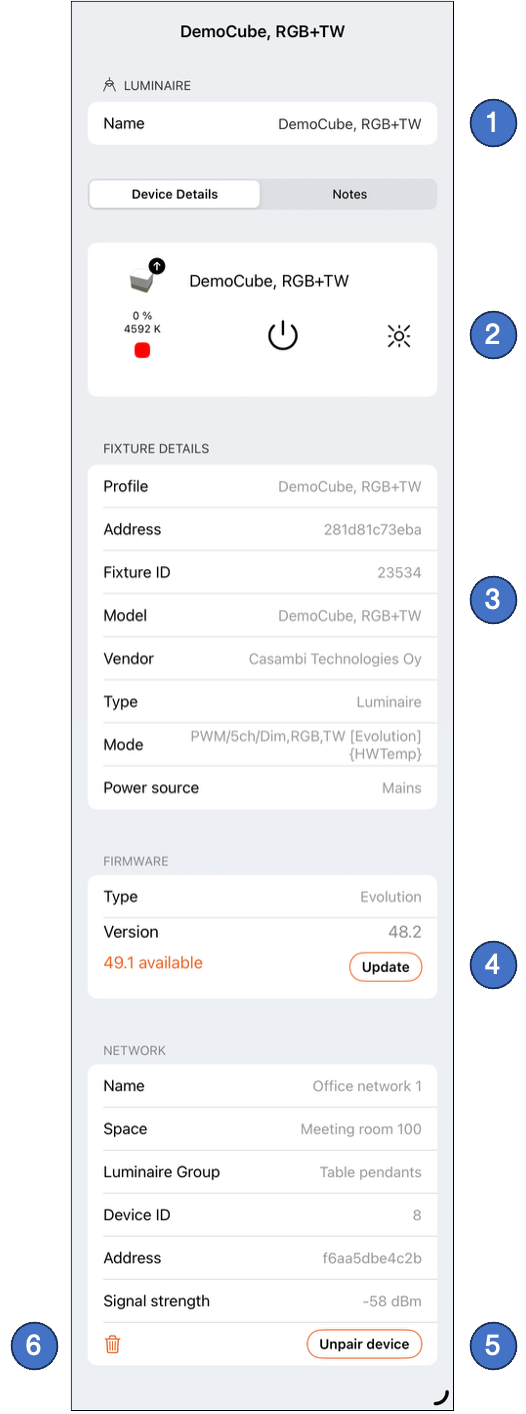
Common parameters across all paired devices include fixture profile, firmware, and network details. In addition, each device type displays parameters specific to its functionality. The example below shows the Device Details pane for a paired luminaire.
Direct device operations (such as manual state changes and unpairing), firmware updates, and fixture profile changes require an active BLE connection. Therefore, these actions can only be performed using Casambi Pro for iOS.
Casambi Pro for Windows also displays the device details but only the device name is editable.
-
Device Name: The editable name assigned to the device.
-
Fixture Image & Live Status:
- If a firmware update is available, an update arrow icon appears in the top-right corner of the fixture image.
- Luminaires: Current operational status is displayed beneath the image. Controls are available to turn the luminaire On/Off or trigger Identify (flash).
- Lux Sensors: The current ambient lux measurement is displayed beneath the image.
-
Fixture Profile Details: Displays specifications of the currently active fixture profile. When a device is unpaired, the profile can be changed by tapping the Profile row. The fixture profile cannot be modified while the device is paired to a network.
-
Firmware Update: If a newer firmware version is available, tap Update to initiate the update process. Read more in the Firmware Updates page.
-
Unpair Device: Unpairs the device from the Casambi mesh network.
-
Remove Device: Removes the device record from the project database.
Use Remove Device only when a device must be permanently deleted from the project and cannot be unpaired normally (e.g., if the physical hardware is broken or non-responsive). Removing a device without unpairing it means the network will continue to recognize it as an active node.