Space templates
Overview to space templates
Space templates can be used for creating and managing similar spaces with same kind of group and control structures. For example, if a building has many repetitive spaces like meeting rooms, corridors, or storage rooms, they could be created using a space template. Spaces created with a template will be updated if their master template is edited.
- Space templates can be created and modified only in Casambi Pro for Windows.
- A space template is a completely self-contained, independent object with no dependencies outside its own scope. Because of this, in a space template (and space instances created from it):
- Controllers can only reference scenes and luminaire groups that reside within the template itself.
- Scenes can only include luminaire groups that reside entirely within the template itself.
- External controllers can still reference scenes within a space instance created from a space template.
Summary
- Any space can be saved as a template. When this is done, the original space becomes an instance of the new template.
- When a space is saved as template, all original space’s content is included in the template.
- When a new space is created using a template:
- It inherits all of the template's elements and configuration values.
- Its geometry can be freely modified, but its lighting configuration can only be changed by editing the template itself.
- The same template can be used to create spaces across any layout in the project.
- Templated space instances can belong to any network within the project.
- Space instances can be detached from a template. Once unlinked, the instance becomes an independent space that can be freely edited.
- Note: Once a space is detached from its template, it cannot be relinked back to the template.
- When a space template is edited, changes propagate to all of its child instances.
- If a template's geometry is changed, existing child instances retain their current size, shape, and item locations.
- Limitations apply when deleting a space template if any linked instance contains paired devices.
Principles for using space templates
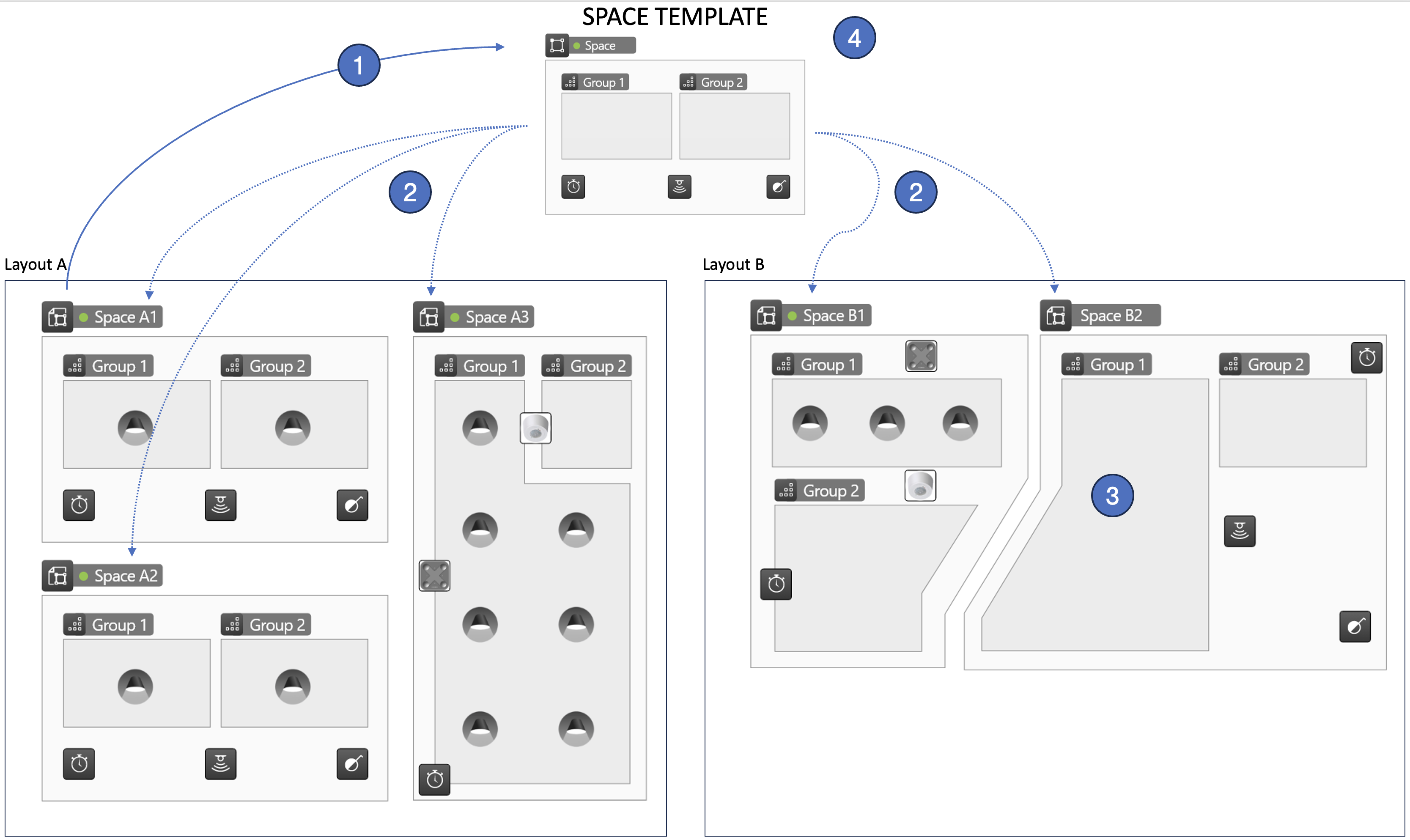
-
A space is constructed with the required content (spaces, luminaire groups, controllers, and scenes) and then saved as a space template.
-
The space template is used to create new space instances:
- Space instances can be created on any layout within a project using the same template.
- Space instances can belong to any network, whether or not a template is used.
-
The resulting space instances share the same control structure and control logic as the space template. However: -The geometry (shape and positioning) of space instances can be freely adjusted, and
- Any number of luminaires can be paired into the luminaire groups (the template does not limit the number of luminaires).
-
To change the configuration logic of space instances derived from a template, edit the template itself. When the changes are saved, they are applied automatically to all space instances linked to that template.
- A space template can be used anywhere in a project, regardless of the layout on which it was originally created.
- A space template can be used to create spaces linked to any network within a project.
- Space template modifications must be made using the Windows PC version of Casambi Pro.