Controlling a Casambi Pro network
The Casambi Pro concept primarily targets lighting installations governed by automated controls—such as sensors and schedules—or manual physical wall switches.
If mobile end-user control is required, it can be handled via the standard Casambi App. However, because the standard Casambi App is not specifically optimized for Casambi Pro networks, the user experience may be less than ideal due to architectural differences between the two systems.
Networks created with Casambi Pro are meant to be configured and controlled by either Casambi Pro Windows App or iOS App.
However, in the case that an end user would require application control over the Pro network, the standard Casambi App can be used. This must first be configured in Casambi Pro for iOS.
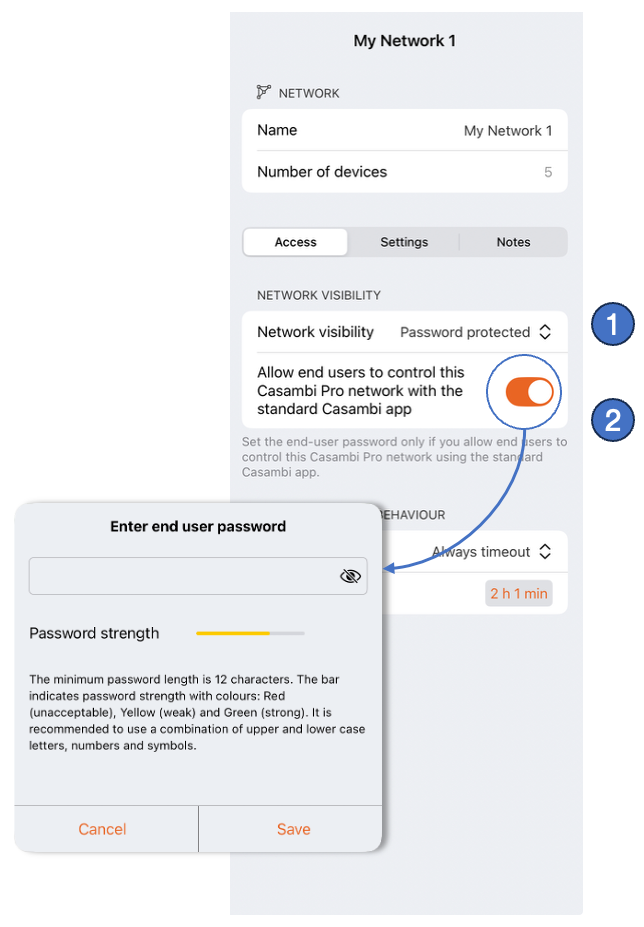
- Set the network visibility to Password protected in the network configuration
- Enable the option Allow end users to control.... This prompts you to create a password to share with the end user. When in the standard Casambi App, using this password and the administrator email address associated with the Pro network, the end user can control the network with User rights (editing the network configuration is not permitted).