Networks
Overview to Casambi Pro networks
To enable both pre-configuration (pre-commissioning) and easy commissioning of Casambi networks, the Casambi Pro is based on the idea where not only the control configuration but also networks are first created as virtual objects. These virtual networks become normal Casambi mesh networks in the commissioning phase where real devices are paired to them with Casambi Pro for iOS.
- Virtual placeholder networks can be created only with Casambi Pro for Windows (in initial version of Casambi Pro).
- There is no limit to number of networks in a project. However, like with the traditional Casambi networks, a single network created with Casambi Pro can have maximum of 250 devices.
- Pairing devices to networks can be done only with Casambi Pro for iOS.
- Networks created with both the Casambi App and the Casambi Pro use the same Casambi Evolution firmware and devices. The Classic firmware is not supported.
- A virtual network is changed to a real Casambi mesh network when the first device (luminaire or controller) is paired to it.
- To be able to pair devices to spaces and groups, each space must be linked to a network before pairing. Linking to a network can be done in space’s properties in both Pro for Windows and Pro for iOS.
Network listings in the user interfaces:
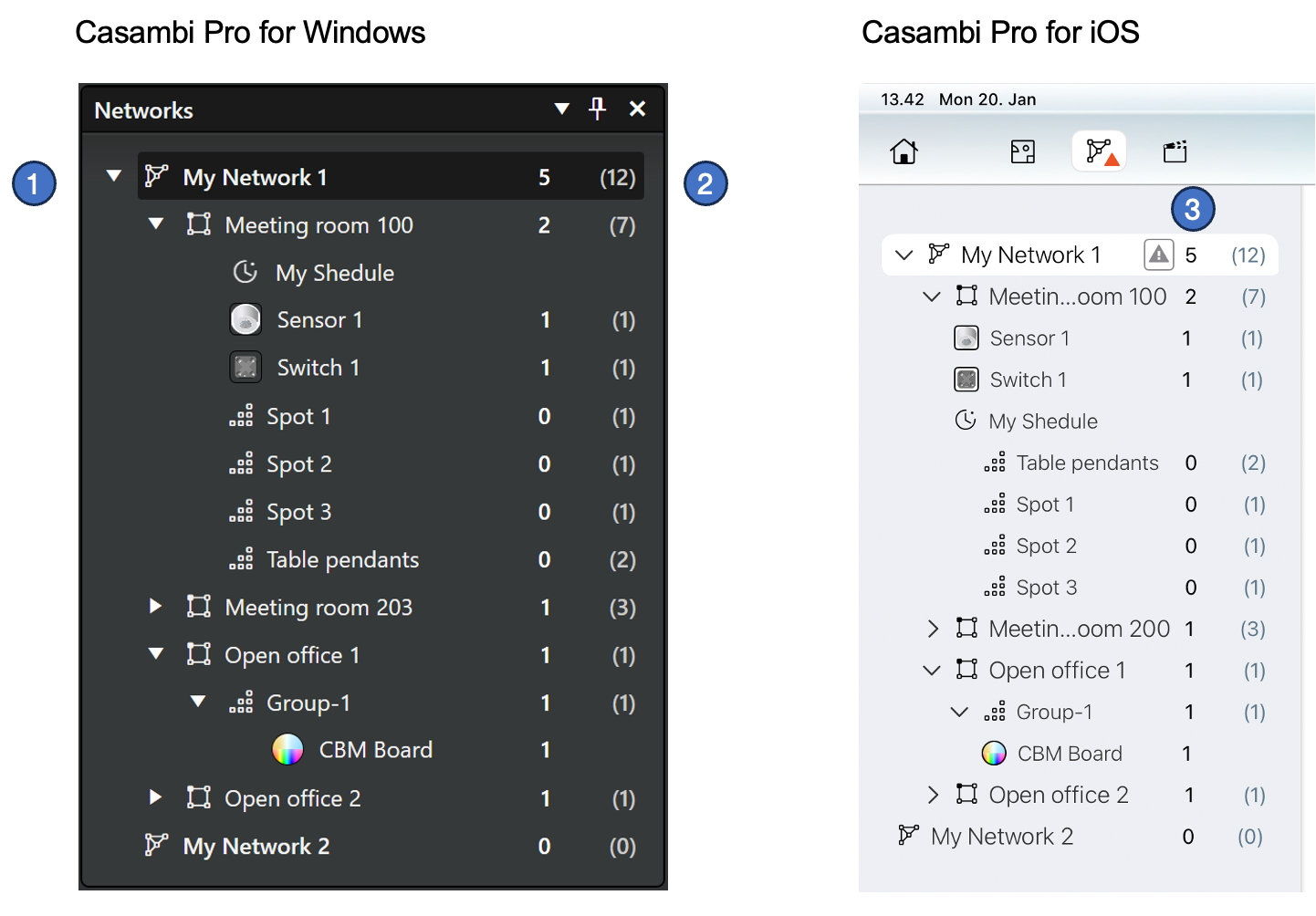
- The network pane lists the networks in the project and the spaces, luminaire groups and devices which belong to them.
- In Windows, if a network row in this list is selected, all spaces which belong to the network are highlighted with green colour on the currently visible layout.
- Each row displays both the number of actual devices and number of estimated devices (in brackets). The network, space and luminaire group rows show the sum of devices under them.
- On Pro for iOS, a triangular indicator is displayed when there are new changes in the configuration which have not yet been uploaded to the actual mesh network.
See more information in the Pairing devices to networks page.
Notes about networks
Notes
- Networks created with Casambi Pro can be opened with the Casambi App for controlling only.
- Note, that when opening a Casambi Pro network with the Casambi App, the user experience is not optimal as the standard Casambi App is not built for displaying Pro networks. Its user interface does not support layouts (floor plans) or usage of spaces and space templates. Due to this, the user interface may be filled with numerous similar objects and navigation may be difficult.
- Configurations of networks created with Casambi Pro cannot be changed with the standard Casambi App.
- Pairing devices to networks can be done only with Casambi Pro for iOS.
- Unpairing devices from networks can be done with Casambi Pro for iOS.
- Technically it is possible use the Casambi App for unpairing a device from a network created with Casambi Pro, but this is not recommended. If a device is unpaired with the standard Casambi App, the project in Casambi Pro does not get information that the unpaired device does not belong to the network anymore. Thus, Casambi Pro will still show the device as part of the network.
- Casambi Pro for Windows cannot be used for pairing or unpairing devices to/from Casambi networks.