Creating a space template
Any space can be saved as a space template (even an empty space). When a template is created, the original space is converted to an instance of the new template. Space templates can be created only with Casambi Pro for Windows.
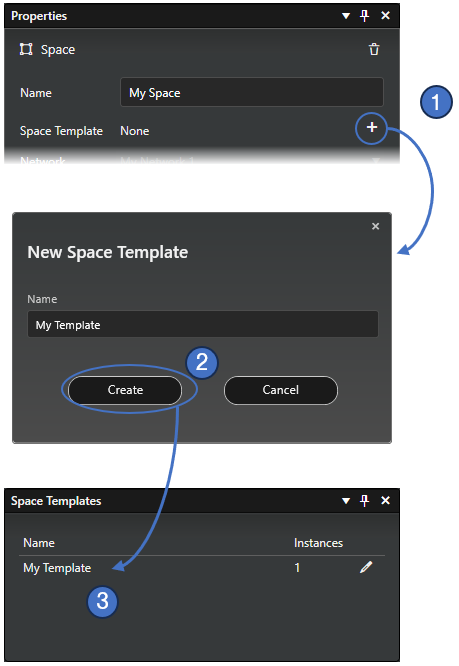
- Select a space (usually it has groups, controllers and scenes with configuration).
Save the space as a new template by clicking the plus (+) button in the Properties pane.
- Enter a name for the template in the New Space Template dialog and click Create.
- The new space template is created, and it appears in the Space templates pane, and it can be used when creating new spaces.
When a new space template is created from a space instance, the space's contents—including luminaires, luminaire groups, controllers, and scenes—are copied to the template.
A space template is a completely self-contained, independent object with no dependencies outside its own scope. Consequently, space templates can only include scenes and groups that reside entirely within the template itself. A scene in a space template (or a space instance created from a template) cannot include luminaire groups from outside the space. Because of this, you cannot create a space template from a space containing scenes that reference external luminaire groups.
External controllers can still reference scenes within a space instance created from a space template. For example a sensor from other space can activate a scene inside a space linked to a space template.
If you want to create a space template from a space that references external objects, you can:
- Remove references to external luminaire groups from its scenes and controllers, or
- Duplicate the space first to preserve the original, remove the external references from the copy, and create the space template from that copy.