Space templates
Overview to space templates
Space templates can be used for creating and managing similar spaces with same kind of group and control structures. For example, if a building has many repetitive spaces like meeting rooms, corridors, or storage rooms, they could be created using a space template. Spaces created with a template will be updated if their master template is edited.
Space templates can be created and modified only in Casambi Pro for Windows.
Summary:
- Any space can be saved as a template. When this is done, the original space will be an instance of the new template.
- When a space is saved as template, all original space’s contents is included in the template.
- When a new space is created by using a template,
- It will inherit all template’s elements and configuration values.
- Its geometry can be freely changed, but the lighting configuration must be edited by editing the template itself.
- Same template can be used for creating spaces on any of the layouts in the project.
- Templated space instances can belong to any network in the project.
- Space instances can be detached from the template. After the link to the template is broken, the space instance will become an independent space which can be freely edited.
- Note: If space’s link to the space template is deleted, it is not possible to link it again to a template.
- When a space template is edited, the changes will be propagated to all of its child instances.
- If template’s geometry is changed, the existing child instances' sizes, shapes or item locations are not changed.
- There are limitations for deleting of space templates if any of the spaces created from the template has paired devices in them.
Principles for using space templates
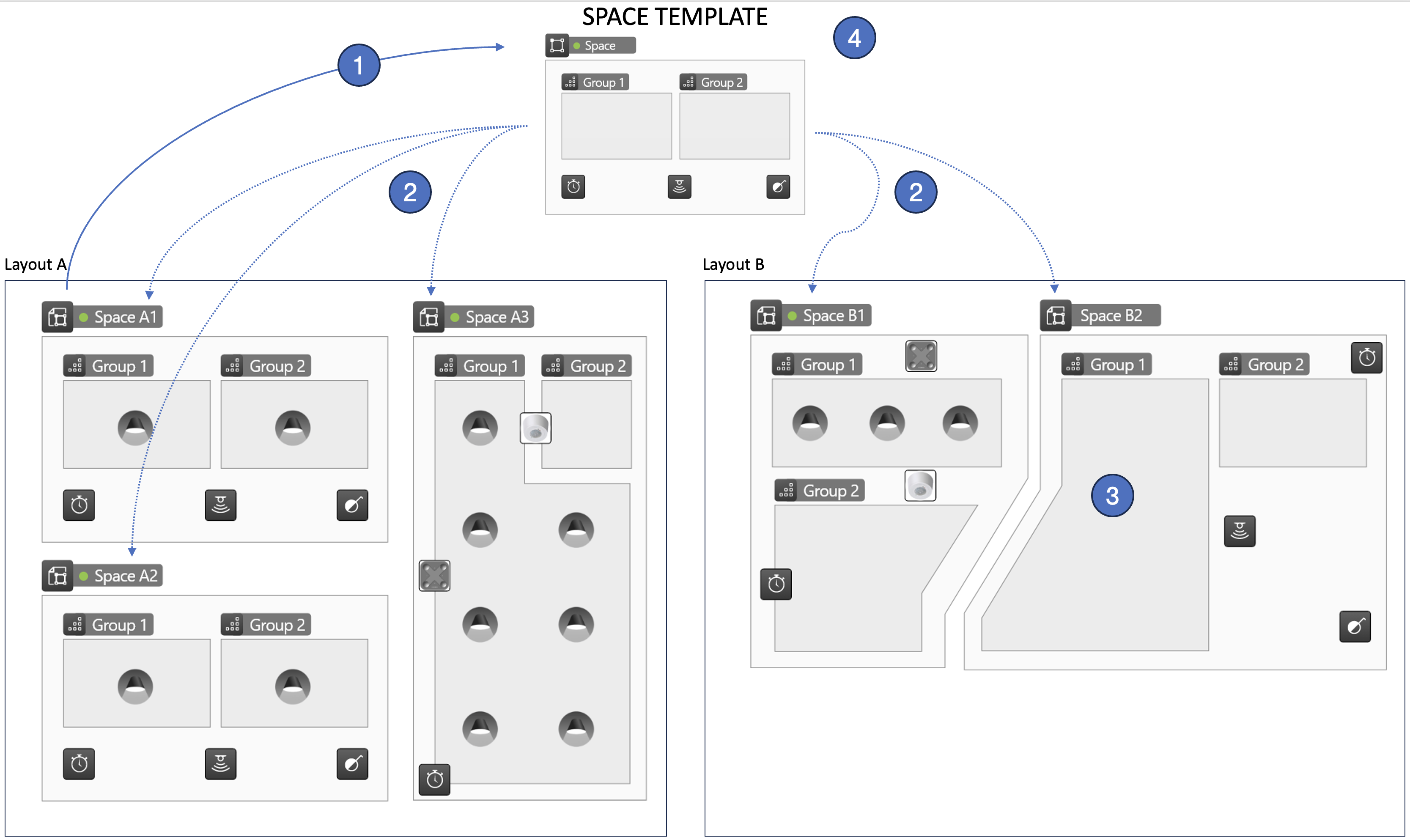
- A space is constructed with needed contents (spaces, luminaire groups, controllers and scenes). Then the space is saved as a space template.
- The space template is used when creating new space instances.
- Space instances can be created on any layout in a project, using the same template.
- Space instances can belong to any network, regardless of if a template is used or not.
- The created space instances have the same control structure and control logic as the space template. However,
- Their geometry (shape and positioning) can be freely adjusted, and
- Any number of luminaires can be paired into the luminaire groups (the template does not limit contents of luminaire groups).
- If there is a need to change configuration of the space instances following a space template, it is done by editing the template itself.
When changes are saved, they are applied automatically to all space instances following the template.
Notes about space templates
Notes
- A space template can be used anywhere in a project, regardless on which layout it was first created.
- A space template can be used to create spaces which are linked to any network in a project.
- In the initial Casambi Pro for iOS versions, it is not possible to edit parameters of spaces or its contents if the space uses a space template.
- Space template editing needs to be done using the Windows PC version of Casambi Pro.