Firmware updates
Firmware Updates
Casambi Pro for iOS indicates whenever a new firmware version is available for devices. Firmware can be updated directly from the device's properties pane.
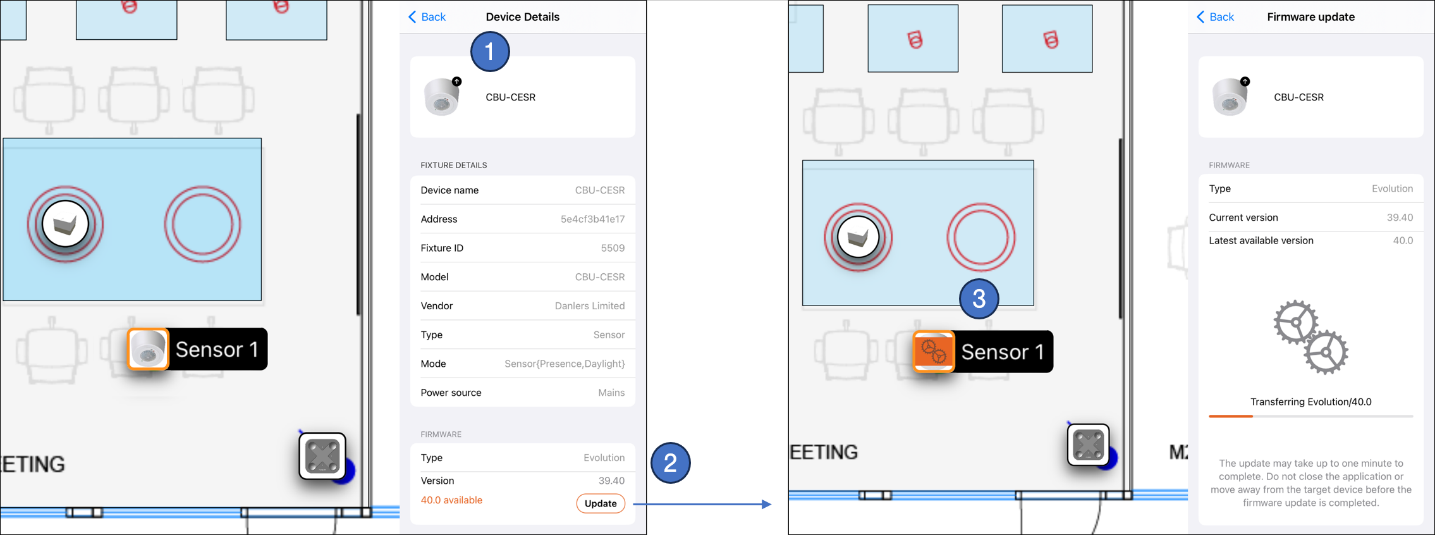
Updating Device Firmware:
-
Select the device in the layout or Project Explorer to open its Properties pane.
-
Review the Firmware section for the current firmware type and version. If a newer version is available and the device is within Bluetooth range of the iOS device, the new version number and an Update button appear. Available firmware updates are also indicated by an up-arrow icon next to the device image at the top of the properties pane and in the Nearby Devices list.
Tap Update to begin the firmware installation. -
While the update is running, progress is indicated both in the device details pane and directly on the device icon in the layout.
Once a single device in a network is updated, the new firmware automatically propagates (floods) across the mesh network to update all other compatible devices in the same network. Devices receiving the update will display their progress in the layout, and the network remains fully operational during this process.