Sensors
Sensor properties
Casambi Pro supports both presence and daylight functionalities. However, it is good to note that the sensor property pane shows the device details and settings for configuring only the presence sensors. The lux/daylight sensor values from a daylight sensor are used for controlling dimming in scenes, so the daylight related settings can be found in the scene property pane.
Windows
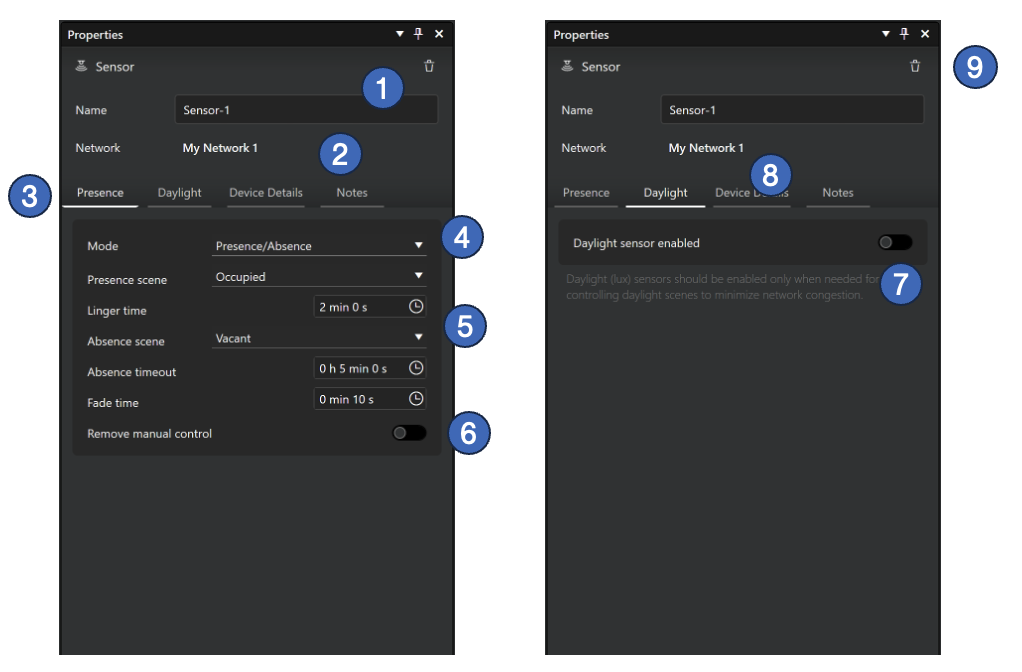
- Name of the sensor (mandatory).
- Network where the sensor belongs to. A sensor belongs always to the same network than its parent space.
- There are separate tabs for the Presence and Daylight (lux sensing) properties
- Presence sensor mode selection.
- Presence
- Presence/Absence
- Absence
- Parameters for the selected presence sensor mode.
- Remove manual control option, for automatic removal of the sensor control from the control hierarchy when presence is no longer detected and the linger time has passed.
- Selection for enabling daylight (lux) sensing feature for the sensor. Use this setting to enable daylight (lux) sensing. It’s off by default to minimize data traffic. When the sensor is used in daylight-controlled scenes, this setting is automatically turned on.
- After pairing, the Device Details tab shows details of the real sensor device.
- The sensor can be deleted by clicking the Delete button (trash can icon) at the top right corner of the property pane.
A real paired sensor should always be unpaired first before it is deleted from a project. Otherwise, the network still thinks that the controller is part of the network.
iPad and iPhone
On iOS devices, sensor properties include some additional information compared to what is seen in Windows:
- For lux sensors, the lux values are shown under the device icon
- Firmware can be updated if there is a newer version available
- Device can be unpaired from the network
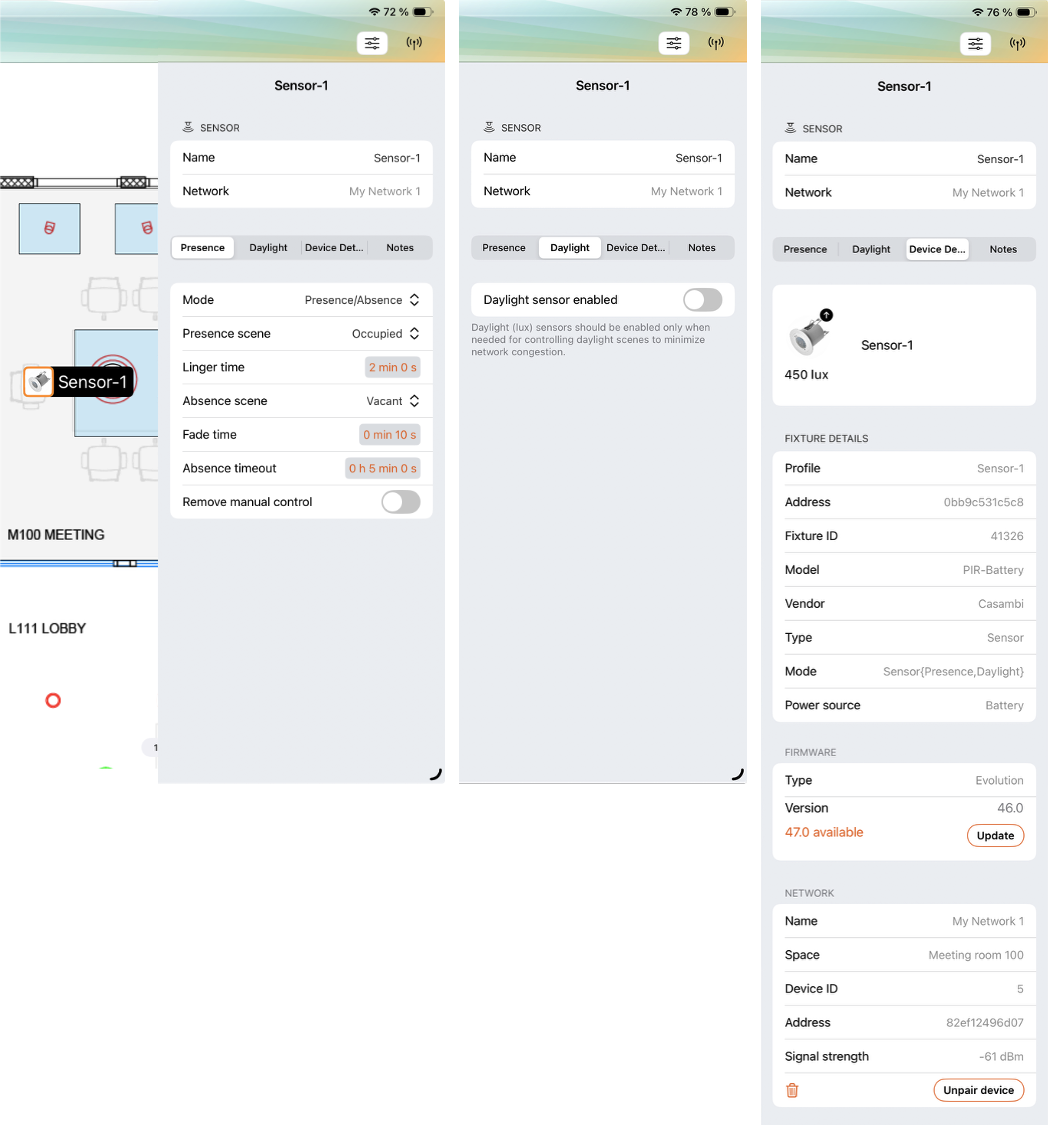
Presence sensor mode options
- Presence
- Presence/Absence
- Absence
When in Presence mode, the presence sensor activates a scene after detecting a presence. When the presence is no longer detected and the linger time has passed, it will be faded out.
| Property | Values |
|---|---|
| Presence scene | Selection list of all scenes in the current space. One can be selected. |
| Linger time | Time setting, value range: 0 s – 59 min 59 s. |
| Fade time | Time setting, value range: 0 s – 59 min 59 s. |
| Remove manual control | On / Off |
When in Presence/Absence mode, the presence sensor activates a scene after detecting a presence. When the presence is no longer detected and the linger time has passed, the absence scene will be faded in.
| Property | Values |
|---|---|
| Presence scene | Selection list of all scenes in the current space. One can be selected. |
| Linger time | Time setting, value range: 0 s – 59 min 59 s. |
| Absence scene | Selection list of all scenes in the current space. One can be selected. |
| Absence timeout | Time setting, value range: 0 s – 23 h 59 min 59 s. |
| Fade time | Time setting, value range: 0 s – 59 min 59 s. |
| Remove manual control | On / Off |
The Absence mode is not a direct control. It will time out the manual control on affected luminaires after the presence is no longer detected and the linger time has passed.
| Property | Values |
|---|---|
| Linger time | Time setting, value range: 0 s – 59 min 59 s. |
| Absence scene | Selection list of all scenes in the current space. One can be selected. |
| Absence timeout | Time setting, value range: 0 s – 23 h 59 min 59 s. |
| Fade time | Time setting, value range: 0 s – 59 min 59 s. |
| Remove manual control | On / Off |