Smart Switching
With the Smart switch feature, ordinary mains wall switches can be used as dimmers or configured to control luminaires or scenes. This feature is only available for Casambi devices with a direct mains input. Products that use an additional power supply (e.g., CBU-PWM-4) do not have Smart switch capability.
The Smart switch mode can be configured in the Casambi app. It is possible to assign a different Smart switch mode to each Casambi-enabled luminaire. For example, you can use a Smart Switch to turn on a scene when you get home or switch the lighting to suit a dinner party or a movie night.
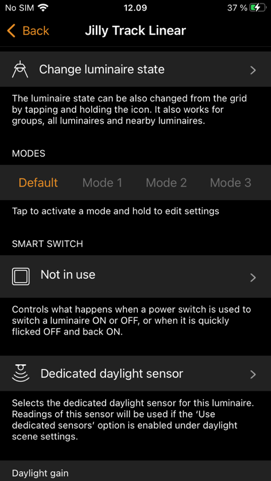
Go to the Luminaires tab and double tap the luminaire icon you wish to assign a Smart switch mode to.
Go to the Smart switch section and select the current mode to open the Smart switch selection.
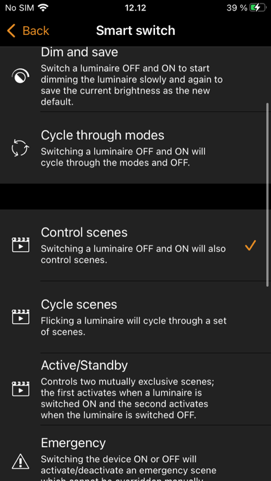
The possible Smart switch modes are:
- Not in use
- Dim and save (Controls one luminaire)
- Cycle through modes (Controls one luminaire)
- Control scenes (Controls one or multiple luminaires)
- Cycle scenes (Controls one or multiple luminaires)
- Active / Standby (Controls one or multiple luminaires)
- Emergency activates a scene which cannot be manually over-ridden until the controlling device is powered off (for Evolution networks only)
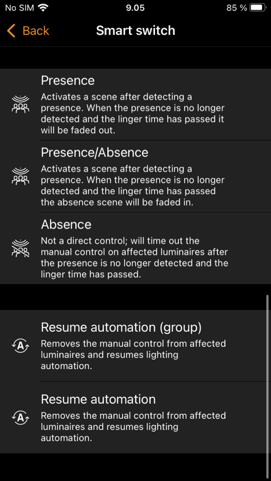
- Presence (Replicates a presence sensor)
- Presence/Absence (Replicates a presence/absence sensor)
- Absence (Replicates an absence sensor)
- Resume automation (group) (Resumes automation for a single group)
- Resume automation (Resumes automation for the whole network)